Windows 10 & 11 • 100% Local & Private • Includes 72-Hour Free Pro Trial

See what's filling your drive.
Know what's backed up before you delete.

The lightning-fast Windows disk analyzer (~0.8s on a 500 GB SSD) that checks your OneDrive, Google Drive & GitHub backups, protects unsaved code, and reclaims gigabytes in one click.

100% Read-Only Safe Scanning
Zero Admin Prompt Required
One-Time License ($15) or Free Basic
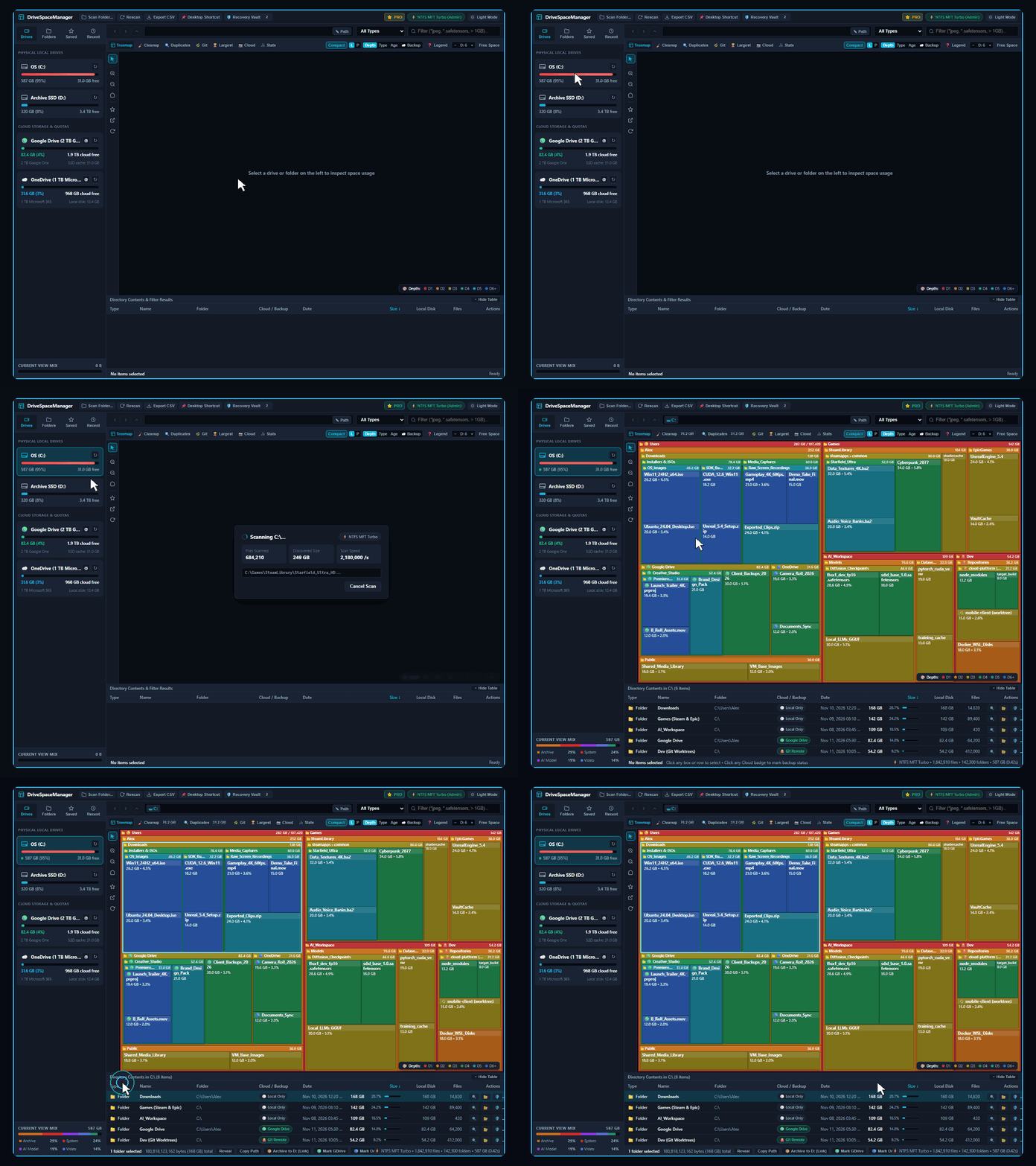
DriveSpace Manager v2.0 β€” 0.42s Scan → 6-Level Visual Map & Backup Status
DriveSpace Manager scanning an entire drive in 0.42 seconds, rendering a 6-level nested visual treemap, and inspecting the largest folders and backup statuses in the table below
AUTO-LOOP (5.5s HOLD) Select your drive → scan finishes in 0.42s → 6-level map & backup badges hold for 5.5s (click anywhere to pause).

4 Big Storage Headachesβ€”Solved in One Click

Standard disk analyzers only show you file sizes and leave you guessing what is safe to touch. Here is how DriveSpace Manager protects your files while reclaiming gigabytes.

01 • CLOUD BACKUP CHECK ☁️ OneDrive & Google Drive

"Is this folder already backed up in OneDrive or Google Drive?"

βœ• Old way: You hesitate to delete a 40 GB photo or document folder because you aren't 100% sure if it's synced to the cloud.
βœ“ Solved: Automatically cross-checks every folder against your local OneDrive & Google Drive sync roots and copies unprotected folders to cloud sync in 1 click.
🟒 Google Drive Synced πŸ”΅ OneDrive Synced ☁️ 1-Click Cloud Copy
02 • GIT TREE MANAGEMENT πŸ™ Git Repos & Worktrees

"Which project folders still have uncommitted or unpushed code?"

βœ• Old way: Deleting old dev workspaces or node_modules is stressful when a forgotten branch or worktree was never pushed to GitHub.
βœ“ Solved: Audits every Git repository and worktree on your drive, flags dirty or unpushed code before you delete anything, and runs Git Push / Prune in 1 click.
🟒 Clean vs. Origin 🟠 Unpushed / Dirty Warning ⚑ 1-Click Push & GC
03 • SAFE CLEANUP & UNDO πŸ›‘οΈ 1-Click Recovery Vault

"Where did 150 GB goβ€”and what if I delete a cache I still need?"

βœ• Old way: Windows Explorer takes minutes to count folder sizes, and permanently deleting hidden caches feels like a gamble.
βœ“ Solved: Scans a 500 GB SSD in ~0.8 seconds into a 6-level visual map and stages cleanups in the 1-Click Recovery Vault so you can restore anything in 1 click.
⚑ ~0.8s 6-Level Map πŸ›‘οΈ Recovery Vault Staging ↩️ 1-Click Restore
04 • RECLAIM WITHOUT BREAKING πŸ“ Seamless Mover & Dedup

"My C: drive is full, but moving folders breaks my installed apps."

βœ• Old way: Dragging a 60 GB game or media library to D: breaks launchers and shortcuts, while duplicate files eat double the space.
βœ“ Solved: Moves heavy folders to D: with a transparent Windows Junction (apps still see C:\...) and merges verified SHA-256 duplicates in 1 click.
πŸ“ C:\ → D:\ Seamless Link πŸ”— SHA-256 Hardlink Merge βœ“ Zero Broken Paths

How DriveSpace Manager Compares

Fast like WizTreeβ€”plus cloud backup verification, Git code protection, and 1-click folder moving that no legacy disk analyzer includes.

Swipe horizontally to compare →
Capability ⭐ OUR APP
DriveSpace Manager
Free + $15 One-Time Pro
WizTree
Disk Analyzer
TreeSize
JAM Software
WinDirStat
Open Source
500 GB SSD Scan Speed ⚑ Lightning Fast (~0.8s) βœ“ Fast (~1.5s) Moderate (~12s) Slow (~60s+)
6-Level Nested Visual Treemap βœ“ 6-Level Map βœ“ Yes Paid Tier Only βœ“ Yes
OneDrive & Google Drive Backup Check βœ“ Included (Pro) βœ• No βœ• No βœ• No
Git Repo & Unsaved Code Protection βœ“ Included (Pro) βœ• No βœ• No βœ• No
1-Click Recovery Vault (Safe Undo) βœ“ Included (Pro) βœ• No Vault βœ• No Vault βœ• No Vault
Move Folders to D: & Merge Duplicates βœ“ 1-Click (Pro) βœ• No $66+ Dedup Only βœ• No
Personal & Commercial Pricing βœ“ Free / $15–$49 Once Free / $39–$175 yr $29–$66+ / yr Free

Start with a 72-Hour Free Pro Trial. Own Pro from $15 once.

Every download starts with 72 hours of full Pro unlocked automaticallyβ€”no credit card required. After 72 hours, keep using Community Free or unlock Pro forever with a one-time payment.

🎁 INCLUDED WITH EVERY DOWNLOAD Community Free ($0) + 72-Hour Full Pro Trial

Test OneDrive & Google Drive backup checks, Git tree protection, the 1-Click Recovery Vault, and Folder Mover free for 72 hours. When your trial ends, we'll prompt you once: upgrade to a one-time Pro plan below, or click Continue with Basic to keep fast drive scanning & Recycle Bin cleanup free forever (requires internet on startup).

VERSION 2.x LICENSE • 3 PCs
Personal Pro
Own v2.x forever on up to 3 home PCs. Includes all version 2 updates (v2.1, v2.2, etc.); future major versions (v3.0+) are optional.
$15 one-time / own v2.x forever
EDITION DIFFERENCES
βœ“ Updates: All v2.x updates included (v3.0+ optional)
βœ“ Computers: Up to 3 Personal PCs
βœ“ Offline Mode: 100% Offline Forever
  • OneDrive & Google Drive Backup Check + Git Tree Protection
  • 1-Click Recovery Vault: Stage cleanups & undo in 1 click
  • Move Folders Across Drives + Duplicate Space Merger
Get Personal Pro ($15)
🏒 COMMERCIAL & IT TECH LICENSE • PORTABLE USB
Team Studio
For businesses, studios & IT pros. Licensed for work/client PCs with Portable Zero-Install USB mode and Lifetime Updates.
$49 one-time / commercial + lifetime
BUILT FOR BUSINESS & IT PROS
🏒 License: Approved for Business & Client PCs + VAT Invoice
🧰 Portable USB: Run off a flash drive with zero install
πŸš€ Updates: Lifetime Updates Forever (5 Workstations)
  • Everything in Perpetual Plus (100% Offline Mode + All Pro Power Tools + Lifetime Upgrades)
  • Official Tax / VAT Invoice for business expense accounting
  • Priority Commercial Support for teams and studios
Get Team Studio ($49)

What's the Difference Between Each Edition?

Key license differences right at the top, followed by the core features in plain English.

What You Get Community ($0) Personal Pro ($15) Perpetual Plus ($25) Team Studio ($49)
1. License Differences (Updates, Offline Mode & Computers)
License & 72h Trial 72h Full Pro Trial → Free Basic βœ“ One-Time ($15) βœ“ One-Time ($49)
Software Updates Community Updates All v2.x Updates πŸ”₯ Lifetime (v2, v3, v4+)
Offline Mode & PCs βœ• Needs Internet • 1 PC βœ“ 100% Offline • 3 PCs βœ“ 100% Offline • 5 PCs
Commercial & USB Mode βœ• Home Use Only βœ• Home Use Only βœ“ Business + USB + VAT
2. Core Features Included
Blazing-Fast Scan & 6-Level Map βœ“ Free Forever βœ“ Included βœ“ Included
OneDrive, Google Drive & Git Checks 72h Trial → Summary βœ“ Full Cloud & Git Check βœ“ Full Cloud & Git Check
Recovery Vault, Folder Mover & Dedup 72h Trial → Recycle Bin βœ“ Full 1-Click Tools βœ“ Full 1-Click Tools

Frequently Asked Questions

Everything you need to know about read-only scan safety, local privacy, Windows permissions, and one-time licensing.

Is DriveSpace Manager safe? Can it accidentally delete my files during a scan?
100% safe. Scanning is strictly read-onlyβ€”DriveSpace Manager never modifies, moves, or deletes a single file while indexing your drives. When you choose to clean files, Community Free sends them to your standard Windows Recycle Bin, and Pro includes the 1-Click Recovery Vault so you can stage cleanups first and restore them to their exact original path in one click.
Does it upload my file names, folders, or cloud data to any server?
Never. All disk scanning, duplicate SHA-256 hashing, OneDrive/Google Drive sync verification, and Git repository checks run 100% locally on your Windows PC. Your file names and directory trees never leave your computer. And once you activate any paid Pro plan ($15 / $25 / $49), the app runs in 100% Offline Mode forever.
How does it check OneDrive, Google Drive, and GitHub without asking for my passwords?
You never enter cloud credentials or connect an online account. DriveSpace Manager automatically detects your local OneDrive and Google Drive sync roots on disk and inspects local .git repository metadata to determine whether folders are synced, local-only, or have uncommitted/unpushed code changes.
Does DriveSpace Manager require Administrator permissions to run?
No. Unlike utilities that force a UAC Administrator prompt every time you open them, DriveSpace Manager runs out-of-the-box as a Standard User using concurrent Win32 directory traversal. If you optionally launch it as Administrator, it enables NTFS USN Journal Turbo pre-read and unlocks system-level storage cleanup (such as Hibernate and Windows Delivery Optimization caches).
Why do mapped network drives sometimes disappear when running as Administrator?
Windows User Account Control (UAC) isolates mapped network drive letters between your standard desktop login and elevated Administrator sessions. To scan mapped network drives or NAS shares, either run DriveSpace Manager in default Standard User mode or enter the network UNC path directly (e.g., \\server\share).
How does "Move Folders Across Drives" (C: to D:) work without breaking my apps or games?
When your primary C: drive fills up, DriveSpace Manager copies the heavy folder to your secondary NTFS drive (D:), verifies every file byte-for-byte, and creates a native Windows Directory Junction at the original C: path. Windows, Steam, Adobe, and your dev tools still access the files through the original C:\... path while the physical gigabytes live on D:.
Is "Merge Duplicates" (NTFS Hardlinks) safe for all files?
DriveSpace Manager verifies exact byte-for-byte identity using full-file SHA-256 hashing before linking duplicate files on the same NTFS volume to a single physical disk allocation (CreateHardLinkW). All original file paths remain intact while freeing duplicate spaceβ€”making it ideal for static libraries, media exports, installers, and package caches (node_modules / .venv).
How does the 72-Hour Free Pro Trial work when I first download?
When you launch DriveSpace Manager for the first time, 100% of Pro features unlock automatically for 72 hoursβ€”no credit card or email required. When the 72-hour trial finishes, the app notifies you and lets you either enter a one-time license key (Personal Pro $15, Perpetual Plus $25, or Team Studio $49) or click Continue with Basic to use Community Free forever.
What is the exact difference between Personal Pro ($15), Perpetual Plus ($25), and Team Studio ($49)?
All three are one-time purchases that unlock every Pro feature and 100% Offline Mode forever:
• Personal Pro ($15 β€” Own v2.x Forever): Activates up to 3 Personal PCs and includes all updates within version 2 (v2.1, v2.2, etc.). Future major versions (v3.0+) are optional.
• Perpetual Plus ($25 β€” Lifetime Major Upgrades): Activates up to 5 Personal PCs and includes every future major version (v2.x, v3.0, v4.0+) free for life.
• Team Studio ($49 β€” Commercial & IT Tech): Approved for business, commercial & client PCs (up to 5 workstations), includes Portable Zero-Install USB Mode, Official Tax/VAT Invoice, and Lifetime Major Upgrades.
What if I replace my PC, or what if I want a refund?
Your license covers 3 to 5 PCs simultaneously, and if you ever build or buy a new computer, just email support@drivespacemanager.com and we'll reset your seat activations promptly. Every purchase is also backed by a 30-day no-questions-asked 100% money-back guarantee.